

SOFTWARE ENGINEERING · ~12 MIN READ
Microservices in practice:
understanding the architecture with Node.js and TypeScript
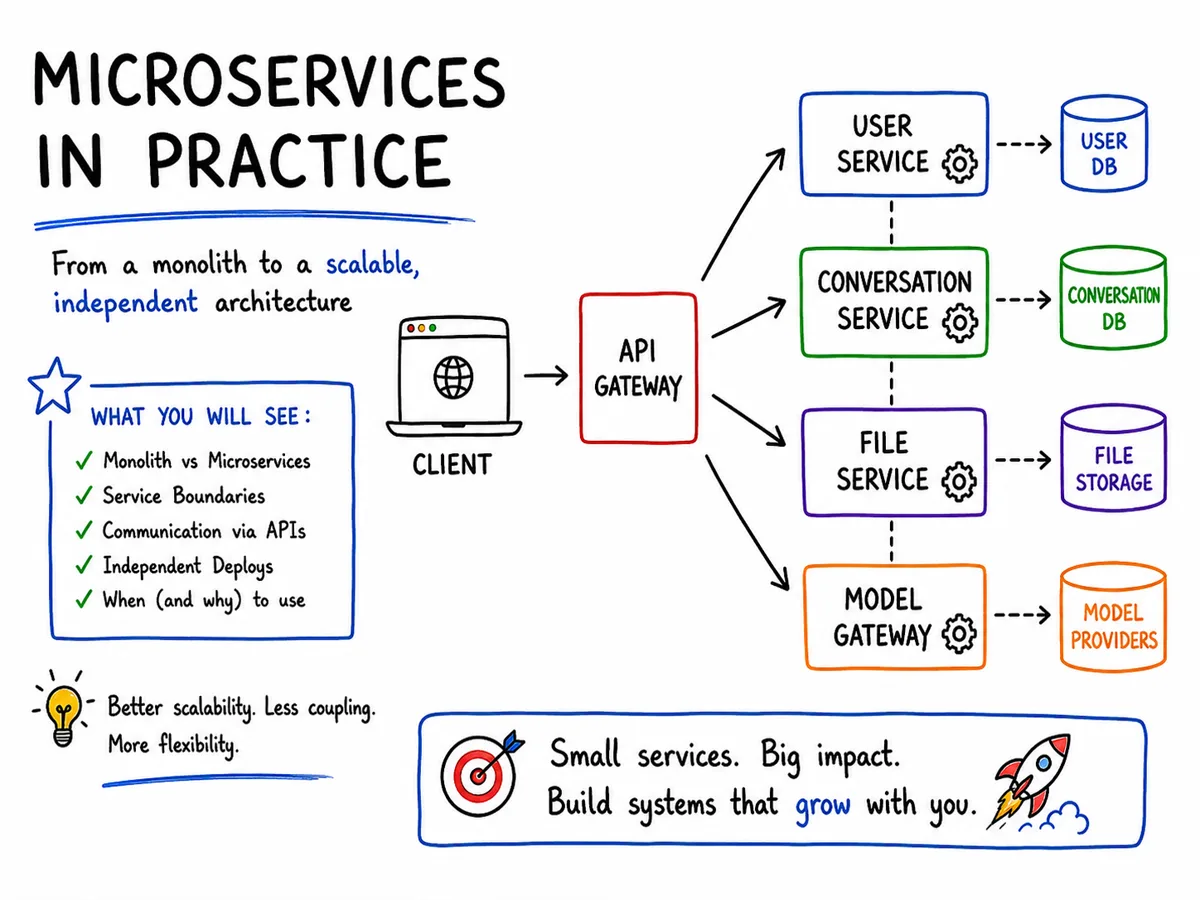
Think of an AI platform. Instead of putting users, conversations, files, and model requests on the same server, each part becomes a separate service.
SECTION 01
What is microservices architecture
Microservices architecture is a way of structuring a system as a set of small, independent services, instead of a single application.
Each service runs in its own process, has its own responsibility, and communicates with the others through an API.
SECTION 02
Example of a monolithic application
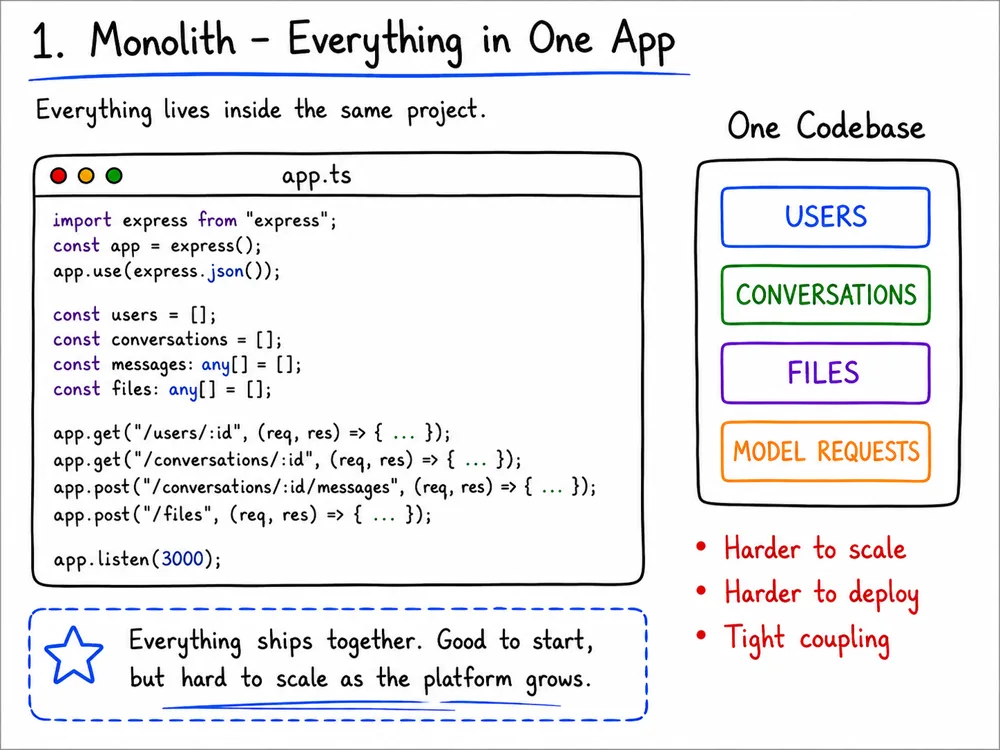
Everything lives inside the same project:
import express from "express";

const app = express();
app.use(express.json());

const users = [
  { id: 1, name: "Marcelo" }
];

const conversations = [
  { id: 1, title: "Onboarding" }
];

const messages: any[] = [];
const files: any[] = [];

app.get("/users/:id", (req, res) => {
  const user = users.find(
    user => user.id === Number(req.params.id)
  );

  res.json(user);
});

app.get("/conversations/:id", (req, res) => {
  const conversation = conversations.find(
    conversation => conversation.id === Number(req.params.id)
  );

  res.json(conversation);
});

app.post("/conversations/:id/messages", (req, res) => {
  const message = {
    id: messages.length + 1,
    conversationId: Number(req.params.id),
    content: req.body.content
  };

  messages.push(message);

  res.status(201).json(message);
});

app.post("/files", (req, res) => {
  const file = {
    id: files.length + 1,
    name: req.body.name,
    size: req.body.size
  };

  files.push(file);

  res.status(201).json(file);
});

app.listen(3000);
Here, everything runs together:
Application
├── Users
├── Conversations
├── Files
└── Model Requests
If you change how messages are generated, you usually need to redeploy the entire application.
SECTION 03
Splitting into User, Conversation, File, and Model Gateway
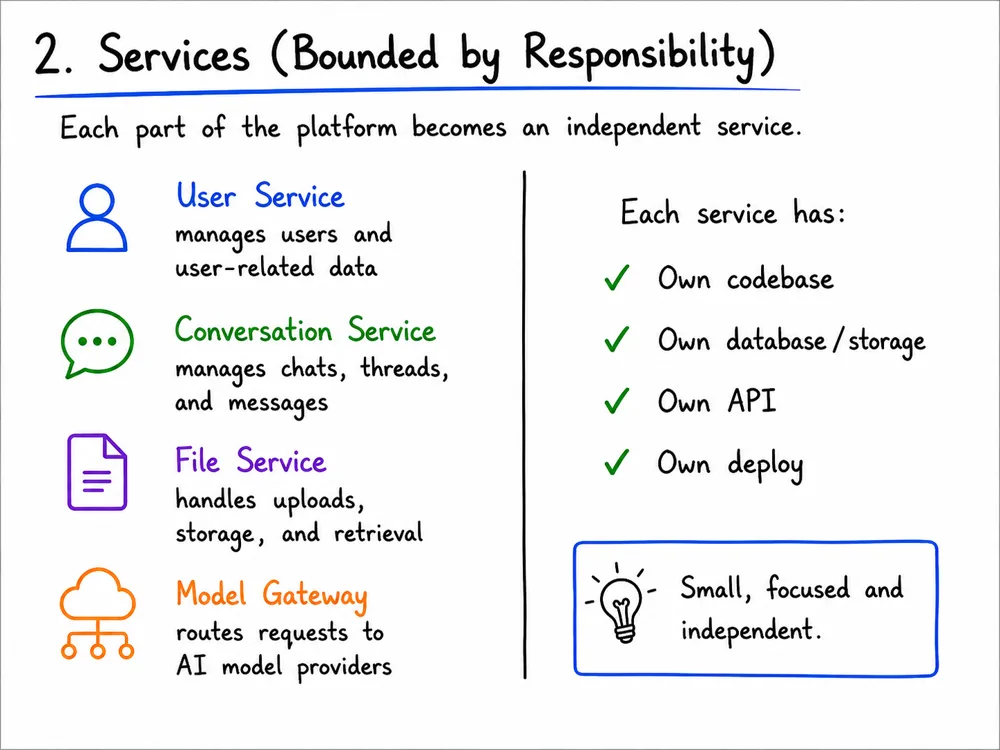
Now we split the system into four independent applications:
User Service           port 3001
Conversation Service   port 3002
File Service           port 3003
Model Gateway          port 3004
Each service has its own responsibility.
import express from "express";

const app = express();

const users = [
  { id: 1, name: "Marcelo" },
  { id: 2, name: "Ana" }
];

app.get("/users/:id", (req, res) => {
  const user = users.find(
    user => user.id === Number(req.params.id)
  );

  if (!user) {
    return res.status(404).json({
      message: "User not found"
    });
  }

  res.json(user);
});

app.listen(3001, () => {
  console.log("User Service running on port 3001");
});
Responsibility:
Create, read, and update usersimport express from "express";
const app = express();
app.use(express.json());
const files: any[] = [];
app.post("/files", (req, res) => {
const file = {
id: files.length + 1,
name: req.body.name,
size: req.body.size
};
files.push(file);
res.status(201).json(file);
});
app.listen(3003, () => {
console.log("File Service running on port 3003");
});Responsibility:
Store and serve uploaded filesimport express from "express";
const app = express();
app.use(express.json());
app.post("/generate", async (req, res) => {
const { prompt } = req.body;
// In production, this calls an AI provider
// (OpenAI, Anthropic, etc.) behind the scenes.
const reply = {
text: `Reply to: ${prompt}`
};
res.json(reply);
});
app.listen(3004, () => {
console.log("Model Gateway running on port 3004");
});Responsibility:
Route requests to AI model providersThe conversation service needs to talk to the other services through APIs.
import express from "express";

const app = express();
app.use(express.json());

const conversations = [
  { id: 1, title: "Onboarding" }
];

const messages: any[] = [];

app.get("/conversations/:id", (req, res) => {
  const conversation = conversations.find(
    conversation => conversation.id === Number(req.params.id)
  );

  if (!conversation) {
    return res.status(404).json({
      message: "Conversation not found"
    });
  }

  res.json(conversation);
});

app.post("/conversations/:id/messages", async (req, res) => {
  const { userId, content } = req.body;

  const userResponse = await fetch(
    `http://localhost:3001/users/${userId}`
  );

  if (!userResponse.ok) {
    return res.status(400).json({
      message: "Invalid user"
    });
  }

  const modelResponse = await fetch(
    "http://localhost:3004/generate",
    { method: "POST", body: JSON.stringify({ prompt: content }) }
  );

  if (!modelResponse.ok) {
    return res.status(502).json({
      message: "Model request failed"
    });
  }

  const user = await userResponse.json();
  const reply = await modelResponse.json();

  const message = {
    id: messages.length + 1,
    conversationId: Number(req.params.id),
    user,
    content,
    reply: reply.text
  };

  messages.push(message);

  res.status(201).json(message);
});

app.listen(3002, () => {
  console.log("Conversation Service running on port 3002");
});
SECTION 04
Communication between services via API
In production, clients don't call each service directly. An API Gateway sits in front of everything and routes each request to the right service:
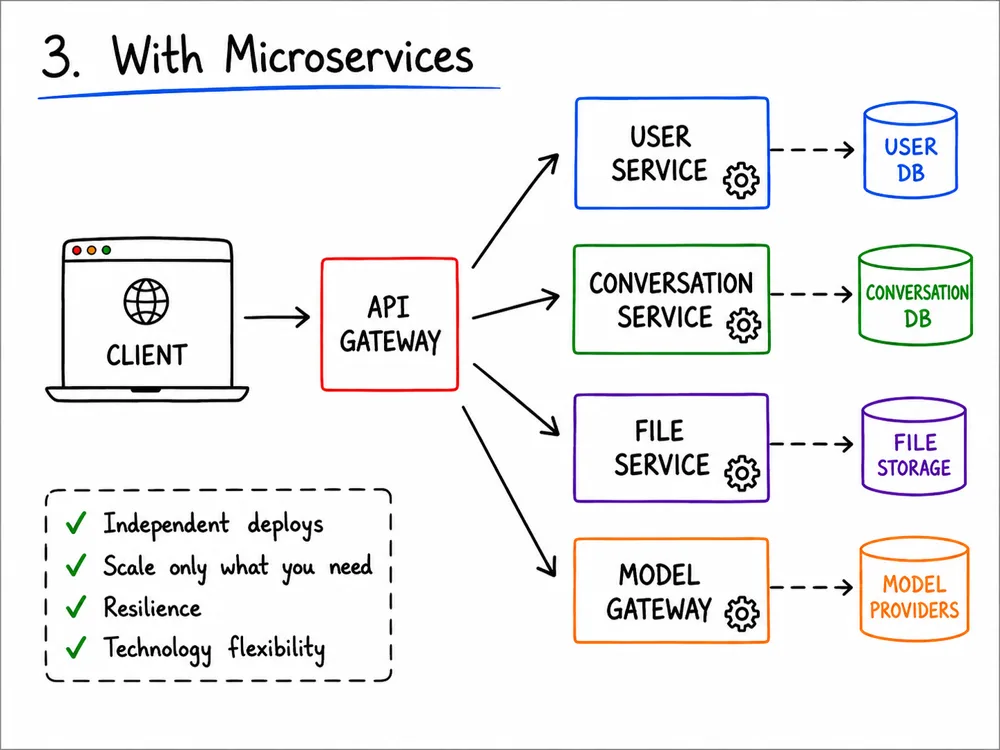
Behind the API Gateway, services still call each other directly when they need data from one another — like the Conversation Service asking the User Service and the Model Gateway before replying to a message. When someone sends a message:
POST http://localhost:8080/conversations/1/messages
Content-Type: application/json

{
  "userId": 1,
  "content": "Hello!"
}
The flow is:
Client
   │
   ▼
API Gateway
   │
   ▼
Conversation Service
   │
   ├── GET User Service
   │
   └── POST Model Gateway
The response could look like:
{
  "id": 1,
  "conversationId": 1,
  "user": {
    "id": 1,
    "name": "Marcelo"
  },
  "content": "Hello!",
  "reply": "Reply to: Hello!"
}
SECTION 05
Deploy and scalability independence
Each service can be developed and deployed separately.
User Service
- Node.js
- PostgreSQL
- 2 servers

File Service
- Go
- Object storage
- 3 servers

Conversation Service
- Python
- PostgreSQL
- 10 servers

Model Gateway
- Node.js
- No database
- 5 servers
Using different technologies isn't mandatory, but it's possible.
If the conversation service gets a lot more traffic, you scale only that one:
User Service
└── 1 instance

File Service
└── 1 instance

Conversation Service
├── instance 1
├── instance 2
├── instance 3
└── instance 4
SECTION 06
Loose coupling
The conversation service doesn't need to know the internal code of the user service.
It only knows the API:
GET /users/1The User Service can change completely on the inside:
// Before
const user = users.find(...);

// After
const user = await database.users.findById(id);
As long as the API keeps returning the same format, the Conversation Service doesn't need to change.
SECTION 07
Database per service
Usually, yes:
User Service
└── User Database

Conversation Service
└── Conversation Database

File Service
└── File Storage

Model Gateway
└── Model Providers (external)
Not every service owns a database. The Model Gateway doesn't persist anything — it exists purely to abstract external AI providers, so the rest of the system never has to know which one you're using.
The Conversation Service shouldn't access the User Service's database directly:
// Avoid
const user = await userDatabase.findById(userId);
The right way is to call the API:
const response = await fetch(
  `http://user-service/users/${userId}`
);
This way, the user database remains the exclusive responsibility of the User Service.
SECTION 08
Microservices versus modular monolith
Microservices doesn't just mean splitting files:
src/
├── users/
├── conversations/
├── files/
└── model-gateway/
That can still be a modular monolith.
Microservices are truly separate applications:
projects/
├── user-service/
│   ├── package.json
│   ├── Dockerfile
│   └── src/
│
├── conversation-service/
│   ├── package.json
│   ├── Dockerfile
│   └── src/
│
├── file-service/
│   ├── package.json
│   ├── Dockerfile
│   └── src/
│
└── model-gateway/
    ├── package.json
    ├── Dockerfile
    └── src/
Each one can have:
- its own server;
- its own database;
- its own repository;
- its own Docker setup;
- its own deploy;
- a team responsible for it.
SECTION 09
Advantages, disadvantages, and when to use
ADVANTAGES
- independent deploy per service;
- independent scalability — only the service that needs it scales;
- freedom to use different stacks per service;
- an isolated failure doesn't necessarily bring down the whole system.
DISADVANTAGES
- network communication adds latency and failure points;
- data consistency gets harder, with no single transaction across databases;
- more infrastructure to operate: multiple deploys, monitoring, distributed logs;
- requires more DevOps and observability maturity.
A monolith is usually enough for small teams or early-stage products. Microservices make more sense when parts of the system — like a conversation engine that suddenly needs to scale, or a model gateway that needs to swap providers — need to scale, evolve, or be deployed differently from one another.
SECTION 10
Conclusion
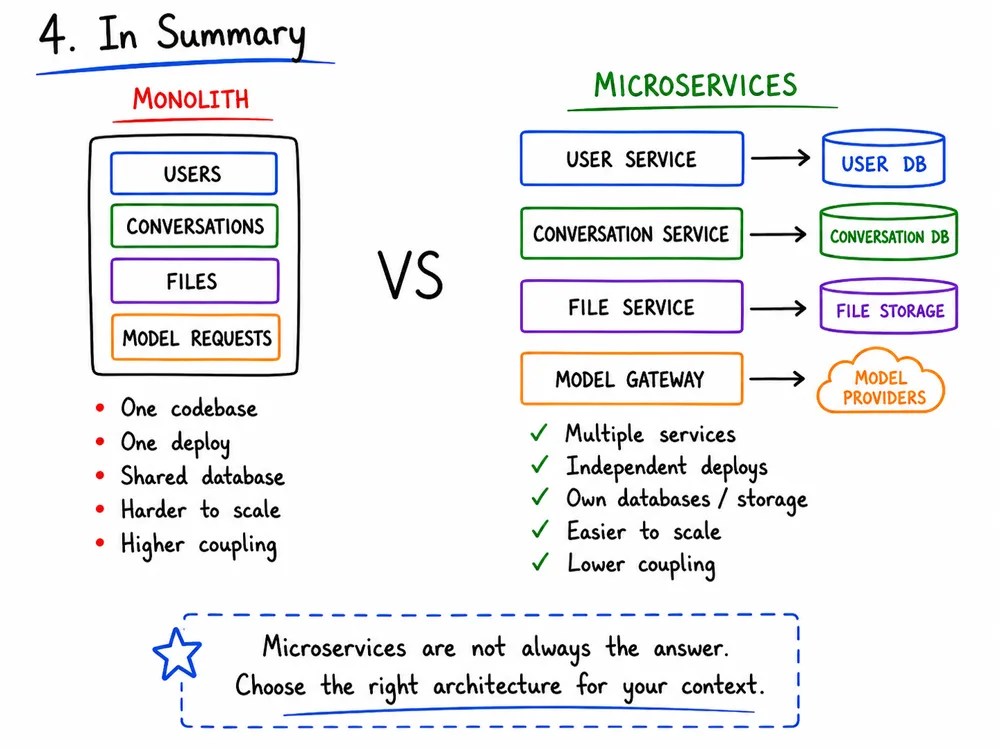
The main idea is:
Monolith:
one large system with several responsibilities.

Microservices:
several small systems, each with one responsibility,
communicating through APIs or events.
THE END · THANKS FOR READING
Want to understand the full architecture?
The System Design article brings cache, queues, resilience, and observability together in one interactive guide.